Visual Flow Framework · CHAPTER 2 OF 5

Visual flow foundations

Why Visual User Flow Can’t Be Ignored

Software cannot be redesigned by looking at screens alone.

Enterprise software is not just a collection of pages.

Users

Tasks

Software cannot be redesigned by looking at screens alone.: Users Tasks Flows Permissions Statuses Inputs Business rules Errors It includes:

Flows

Software cannot be redesigned by looking at screens alone.: Users Tasks Flows Permissions Statuses Inputs Business rules Errors It includes:

Permissions

Statuses

Inputs

Business rules

Errors

It includes:

Software cannot be redesigned by looking at screens alone.

Enterprise software is not just a collection of pages.

It includes:

Users

Tasks

Software cannot be redesigned by looking at screens alone.: Users Tasks Flows Permissions Statuses Inputs Business rules Errors It includes:

Flows

Software cannot be redesigned by looking at screens alone.: Users Tasks Flows Permissions Statuses Inputs Business rules Errors It includes:

Permissions

Statuses

Inputs

Business rules

Errors

Software cannot be redesigned by looking at screens alone.

Enterprise software is not just a collection of pages.

It includes:

Users

Tasks

Software cannot be redesigned by looking at screens alone.: Users Tasks Flows Permissions Statuses Inputs Business rules Errors It includes:

Flows

Software cannot be redesigned by looking at screens alone.: Users Tasks Flows Permissions Statuses Inputs Business rules Errors It includes:

Permissions

Statuses

Inputs

Business rules

Errors

“The UI may look better but users still struggle to complete their work.”

Illustration accompanying When redesigned without understanding the actual flow,

When redesigned without understanding the actual flow,

When redesigned without understanding the actual flow,

“The UI may look better but users still struggle to complete their work.”

Illustration accompanying When redesigned without understanding the actual flow,

When redesigned without understanding the actual flow,

“The UI may look better but users still struggle to complete their work.”

Illustration accompanying When redesigned without understanding the actual flow,

The Problem With Most Redesigns

Most Teams Mistake Redesign for Modern UI

Most redesigns start by looking at the existing screens and changing how they look.

But designers often miss how users actually use the product, where they get stuck, and which flows are already broken.

The result would be a cleaner interface with the same broken experience.

Illustration accompanying Most Teams Mistake Redesign for Modern UI

Most Teams Mistake Redesign for Modern UI

Most redesigns start by looking at the existing screens and changing how they look. But designers often miss how users actually use the product, where they get stuck, and which flows are already broken.

The result would be a cleaner interface with the same broken experience.

Illustration accompanying Most Teams Mistake Redesign for Modern UI

Most Teams Mistake Redesign for Modern UI

Most redesigns start by looking at the existing screens and changing how they look. But designers often miss how users actually use the product, where they get stuck, and which flows are already broken.

The result would be a cleaner interface with the same broken experience.

Illustration accompanying Most Teams Mistake Redesign for Modern UI

A redesign will fail if

The team does not understand the users

The actual user flow is not mapped

Error states are ignored

Role-based variations are not understood

Interconnected flows are treated separately

Edge cases are missed

A redesign will fail if

  • The team does not understand the users

  • The actual user flow is not mapped

  • Error states are ignored

  • Role-based variations are not understood

  • Interconnected flows are treated separately

  • Edge cases are missed

A redesign will fail if

The team does not understand the users

The actual user flow is not mapped

Error states are ignored

Role-based variations are not understood

Interconnected flows are treated separately

Edge cases are missed

A redesign will fail if

The team does not understand the users

The actual user flow is not mapped

Error states are ignored

Role-based variations are not understood

Interconnected flows are treated separately

Edge cases are missed

A redesign will fail if

The team does not understand the users

The actual user flow is not mapped

Error states are ignored

Role-based variations are not understood

Interconnected flows are treated separately

Edge cases are missed

A redesign will fail if

The team does not understand the users

The actual user flow is not mapped

Error states are ignored

Role-based variations are not understood

Interconnected flows are treated separately

Edge cases are missed

What Is Visual User Flow Mapping in UI/UX?

Visual User Flow Mapping

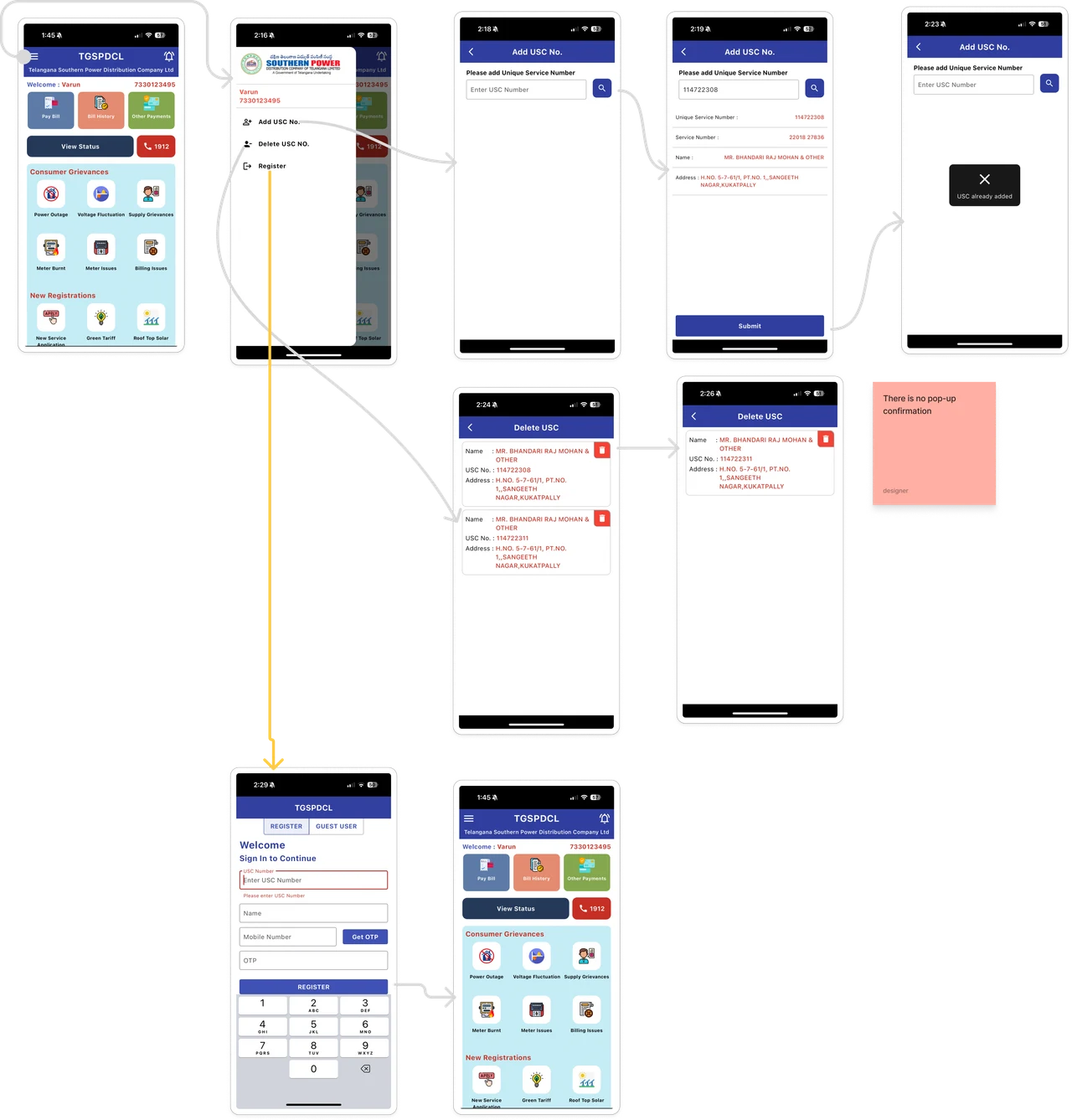
Visual user flow mapping is the process of mapping how users move through existing software using real screenshots.

​

It helps the design team understand how the current software behaves in real usage.

Illustration accompanying Visual User Flow Mapping

Visual User Flow Mapping

Visual user flow mapping is the process of mapping how users move through existing software using real screenshots.

It helps the design team understand how the current software behaves in real usage.
Illustration accompanying Visual User Flow Mapping

Visual User Flow Mapping

Visual user flow mapping is the process of mapping how users move through existing software using real screenshots.

It helps the design team understand how the current software behaves in real usage.

Illustration accompanying Visual User Flow Mapping

“The goal is to understand how users complete tasks inside the software.”

The goal is not just to map screens.

The goal is not just to map screens.

“The goal is to understand how users complete tasks inside the software.”

The goal is not just to map screens.

“The goal is to understand how users complete tasks inside the software.”

Why Visual User Flow Mapping Is Not Optional

Poor Flow Understanding Leads to Wrong Redesign Decisions

In SaaS and enterprise software, users do not always just follow the ideal path.

A good redesign must support what happens when things go right and when things go wrong.

Redesign only the visible screens

Miss broken flows

Ignore edge cases

Skip error states

Create unnecessary steps

Hide important actions

Without visual userflow mapping, teams may:

Poor Flow Understanding Leads to Wrong Redesign Decisions

In SaaS and enterprise software, users do not always just follow the ideal path.

A good redesign must support what happens when things go right and when things go wrong.

Without visual userflow mapping, teams may:

Redesign only the visible screens

Miss broken flows

Ignore edge cases

Skip error states

Create unnecessary steps

Hide important actions

Poor Flow Understanding Leads to Wrong Redesign Decisions

In SaaS and enterprise software, users do not always just follow the ideal path.

A good redesign must support what happens when things go right and when things go wrong.

Without visual userflow mapping, teams may:

Redesign only the visible screens

Miss broken flows

Ignore edge cases

Skip error states

Create unnecessary steps

Hide important actions

Where Visual User Flow Helps in A Redesign

It helps the design team understand

How the user actually moves through the software

Where the task starts and ends

Which steps are unnecessary

Which flows are dependent on each other

Which screens need clearer feedback

It helps the design team understand

  • How the user actually moves through the software

  • Where the task starts and ends

  • Which steps are unnecessary

  • Which flows are dependent on each other

  • Which screens need clearer feedback

It helps the design team understand

How the user actually moves through the software

Where the task starts and ends

Which steps are unnecessary

Which flows are dependent on each other

Which screens need clearer feedback

It helps the design team understand

How the user actually moves through the software

Where the task starts and ends

Which steps are unnecessary

Which flows are dependent on each other

Which screens need clearer feedback

It helps the design team understand

How the user actually moves through the software

Where the task starts and ends

Which steps are unnecessary

Which flows are dependent on each other

Which screens need clearer feedback

It helps the design team understand

How the user actually moves through the software

Where the task starts and ends

Which steps are unnecessary

Which flows are dependent on each other

Which screens need clearer feedback

Once the flow is clearly mapped, the redesign becomes more

Accurate

Once the flow is clearly mapped, the redesign becomes more: Accurate Practical User-focused

Practical

Once the flow is clearly mapped, the redesign becomes more: Accurate Practical User-focused

User-focused

Once the flow is clearly mapped, the redesign becomes more: Accurate Practical User-focused

Once the flow is clearly mapped, the redesign becomes more

Accurate

Practical

User-focused

Once the flow is clearly mapped, the redesign becomes more

The Upslide Visual User Flow Framework

The 5-part visual userflow framework to use before redesigning complex software.

Each step helps the team move from assumption-based redesign to evidence-based redesign.

Collect
Screenshots

The 5-part visual userflow framework to use before redesigning complex software.: Collect Screenshots Understand theLegend Arrange and Map the Flow Identify the Purpose of the Flow Identify Input Dependencies

Understand the
Legend

The 5-part visual userflow framework to use before redesigning complex software.: Collect Screenshots Understand theLegend Arrange and Map the Flow Identify the Purpose of the Flow Identify Input Dependencies

Arrange and Map
the Flow

The 5-part visual userflow framework to use before redesigning complex software.: Collect Screenshots Understand theLegend Arrange and Map the Flow Identify the Purpose of the Flow Identify Input Dependencies

Identify the Purpose of the Flow

The 5-part visual userflow framework to use before redesigning complex software.: Collect Screenshots Understand theLegend Arrange and Map the Flow Identify the Purpose of the Flow Identify Input Dependencies

Identify Input
Dependencies

The 5-part visual userflow framework to use before redesigning complex software.: Collect Screenshots Understand theLegend Arrange and Map the Flow Identify the Purpose of the Flow Identify Input Dependencies
  1. Collect Screenshots

  2. Understand the Legend

  3. Arrange and Map the Flow

  4. Identify the Purpose of the Flow

  5. Identify Input Dependencies

The 5-part visual userflow framework to use before redesigning complex software.

Each step helps the team move from assumption-based redesign to evidence-based redesign.

Collect Screenshots

Understand the Legend

Arrange and Map the Flow

Identify the Purpose of the Flow

Identify Input Dependencies

The 5-part visual userflow framework to use before redesigning complex software.

Each step helps the team move from assumption-based redesign to evidence-based redesign.

FRAMEWORK CONTENTS

Visual Flow Framework

Search documentation

Search scope

Search across all eight guides.

Diagram detail