Visual Flow Framework · CHAPTER 5 OF 5
Applying and validating the flow

The Big Consequences of Poor Flow Mapping
Poor flow mapping creates expensive UX debt.

When visual userflow mapping is skipped, the redesign may look better on the surface but still fail in real usage.
Important steps may be placed in the wrong order, missing states may go unnoticed, and users may continue facing the same friction after redesign.


Broken task flows

Missed edge cases

More support tickets

User confusion

Incomplete workflows

Poor adoption
Poor flow mapping may lead to:
Poor flow mapping creates expensive UX debt.

When visual userflow mapping is skipped, the redesign may look better on the surface but still fail in real usage. Important steps may be placed in the wrong order, missing states may go unnoticed, and users may continue facing the same friction after redesign.


Broken task flows

Missed edge cases

More support tickets

User confusion

Incomplete workflows

Poor adoption
Poor flow mapping may lead to:
Poor flow mapping creates expensive UX debt.
When visual userflow mapping is skipped, the redesign may look better on the surface but still fail in real usage. Important steps may be placed in the wrong order, missing states may go unnoticed, and users may continue facing the same friction after redesign.
Swipe to explore the complete figure


Broken task flows

Missed edge cases

More support tickets

User confusion

Incomplete workflows

Poor adoption
Poor flow mapping may lead to:
How Visual Userflow Improves the Final Design
Good flow mapping leads to better redesign decisions.

With strong visual userflow mapping, the redesign becomes based on real software behavior.
Clearer workflows
Better task completion
Reduced confusion
Smoother onboarding
Lower support dependency
This helps the team create:
Good flow mapping leads to better redesign decisions.
With strong visual userflow mapping, the redesign becomes based on real software behavior.
This helps the team create:
Clearer workflows
Better task completion
Reduced confusion
Smoother onboarding
Lower support dependency
Good flow mapping leads to better redesign decisions.
With strong visual userflow mapping, the redesign becomes based on real software behavior.
This helps the team create:
Clearer workflows
Better task completion
Reduced confusion
Smoother onboarding
Lower support dependency
Visual Userflow Checklist
The Final Check Before moving to next process
If the answer is no for even one or if there is even the tiniest bit ambiguity, the team should not proceed.
Map the missing screens, edge cases, connected flows before making redesign decisions.

Captured the full flow from start to end?
Mapped the ideal flow?
Mapped role-based variations?
Marked connected flows?
Included empty states?
Captured edge cases?
Mapped error states?
Noted visible UX gaps?
Identified the purpose of the flow?
Did you:
Did you:
Captured the full flow from start to end?
Mapped the ideal flow?
Mapped role-based variations?
Marked connected flows?
Included empty states?
Captured edge cases?
Mapped error states?
Noted visible UX gaps?
Identified the purpose of the flow?
Did you:
The Final Check Before moving to next process
If the answer is no for even one or if there is even the tiniest bit ambiguity, the team should not proceed. Map the missing screens, edge cases, connected flows before making redesign decisions.
Captured the full flow from start to end?
Mapped the ideal flow?
Mapped role-based variations?
Marked connected flows?
Included empty states?
Captured edge cases?
Mapped error states?
Noted visible UX gaps?
Identified the purpose of the flow?

The Final Check Before moving to next process
If the answer is no for even one or if there is even the tiniest bit ambiguity, the team should not proceed. Map the missing screens, edge cases, connected flows before making redesign decisions.
Did you:

How Upslide Uses This in Real Projects
Visual Userflow Mapping Comes After Industry Research
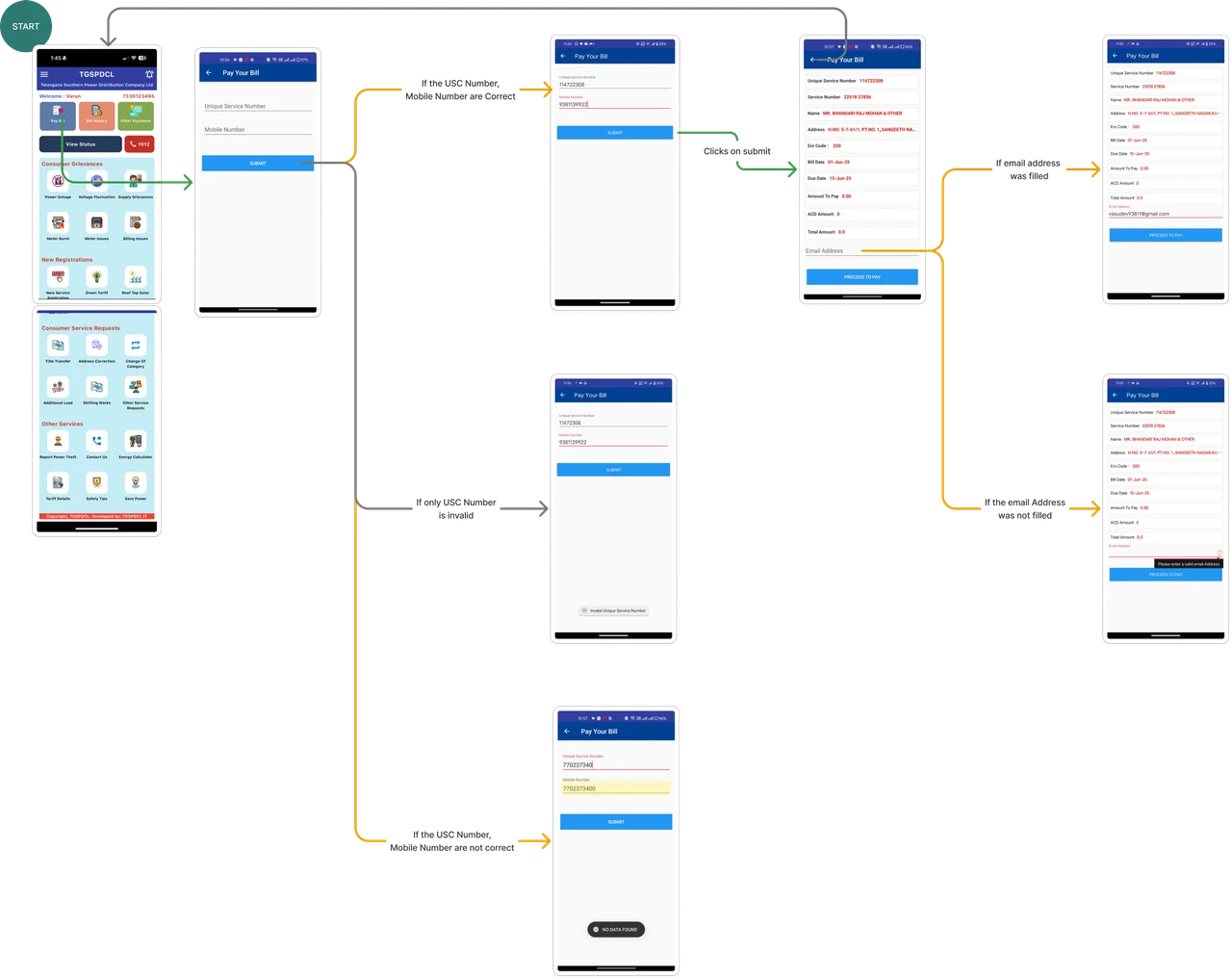
At Upslide, visual userflow mapping comes after industry research.
Industry research helps us understand the context.
Visual userflow mapping helps us understand how the software actually behaves.

Industry Research


Visual Userflow
Visual Userflow Mapping Comes After Industry Research
At Upslide, visual userflow mapping comes after industry research.
Industry research helps us understand the context.
Visual userflow mapping helps us understand how the software actually behaves.

Industry Research


Visual Userflow

Visual Userflow Mapping Comes After Industry Research
At Upslide, visual userflow mapping comes after industry research.
Industry research helps us understand the context.
Visual userflow mapping helps us understand how the software actually behaves.

Industry Research


Visual Userflow

After Visual
Userflow, our process continues with

User persona creation

Competitive analysis

Business Model Canvas

UX audit

Information architecture

Wireframes

UI concepts

Final UI design
After Visual Userflow, our process continues with
User persona creation

Competitive analysis

Business Model Canvas

UX audit

Information architecture

Wireframes

UI concepts

Final UI design
After Visual Userflow, our process continues with
User persona creation

Competitive analysis

Business Model Canvas

UX audit

Information architecture

Wireframes

UI concepts

Final UI design
Final Takeaway
Understand Context. Map the Flow before changing the interface.

The users

The risks

The industry

The business model

The workflows
A good redesign is not just about making screens look better.
It is about understanding
Understand Context. Map the Flow before changing the interface.

A good redesign is not just about making screens look better. It is about understanding

The industry

The business model

The workflows

The users

The risks
Understand Context. Map the Flow before changing the interface.

A good redesign is not just about making screens look better. It is about understanding

The industry

The business model

The workflows

The users

The risks
Before changing the interface, understand what is really slowing users down.
Planning to redesign SaaS & Enterprise Software ?
Before changing the interface, understand what is really slowing users down.
Planning to redesign SaaS & Enterprise Software ?
Before changing the interface, understand what is really slowing users down.
LET’S PUT IT INTO PRACTICE
Ready to improve your SaaS product?
Work with Upslide to uncover UX gaps, simplify complex workflows, and create a product your users can navigate with confidence.