Visual Flow Framework · CHAPTER 4 OF 5

Mapping flows and dependencies

Step 3: Arrange & Map the Flow

Step 3
Arrange & Map the Flow

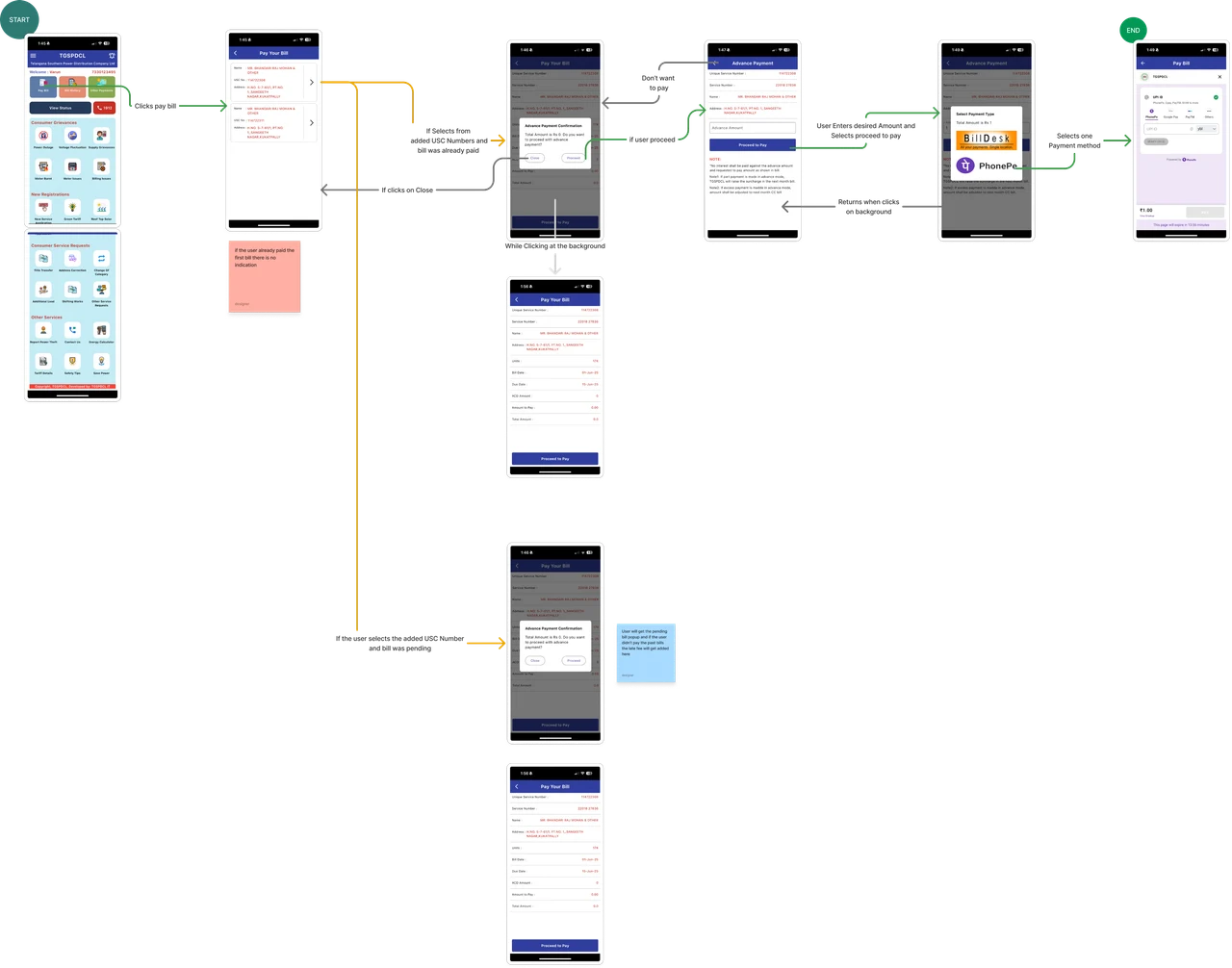
Map the flow based on roles and real task paths.

In SaaS and enterprise software, different user roles may use the same product in different ways.

​

So arrange the screenshots based on the user role and the task they are trying to complete.

Map the flow based on roles and real task paths.: Registered User Guest User

Registered User

Map the flow based on roles and real task paths.: Registered User Guest User

Guest User

Map the flow based on roles and real task paths.: Registered User Guest User

Map the flow based on roles and real task paths.

In SaaS and enterprise software, different user roles may use the same product in different ways.

So arrange the screenshots based on the user role and the task they are trying to complete.
Map the flow based on roles and real task paths.: Registered User Guest User

Registered User

Map the flow based on roles and real task paths.: Registered User Guest User

Guest User

Map the flow based on roles and real task paths.: Registered User Guest User

Map the flow based on roles and real task paths.

In SaaS and enterprise software, different user roles may use the same product in different ways.

So arrange the screenshots based on the user role and the task they are trying to complete.

Swipe to explore the complete figure

Map the flow based on roles and real task paths.: Registered User Guest User

Registered User

Map the flow based on roles and real task paths.: Registered User Guest User

Guest User

Map the flow based on roles and real task paths.: Registered User Guest User

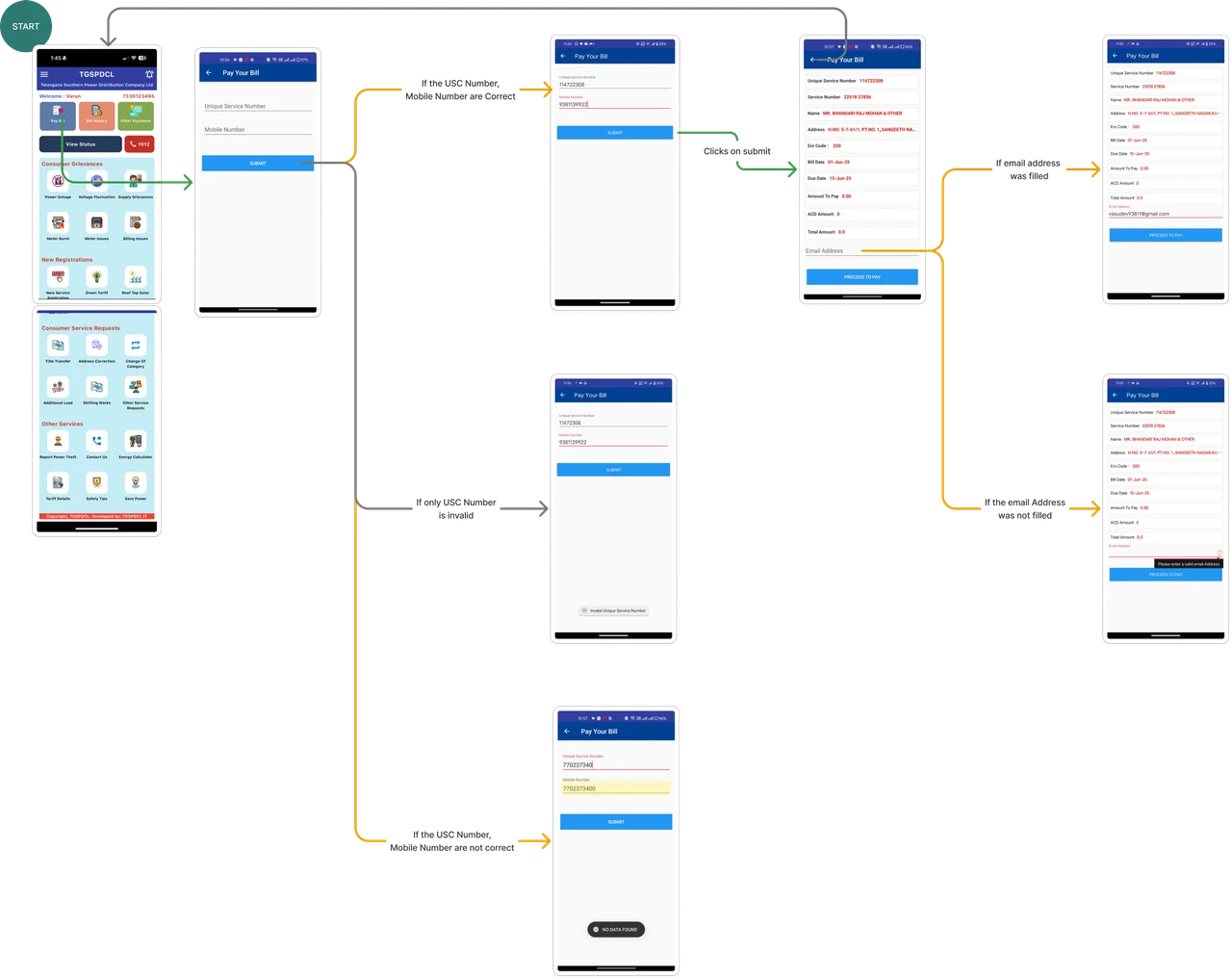
Start with the ideal flow, but don’t map it blindly.
While mapping, also consider decision points, error states, edge cases, empty states, back flows, and connected flows.

​

This helps you capture the real experience, not just the correct steps.

Illustration accompanying Start with the ideal flow, but don’t map it blindly. While mapping, also consider decision points, error states, edge cases, empty states, back flows, and connected flows. This helps you capture the real experience, not just the correct steps.

Start with the ideal flow, but don’t map it blindly. While mapping, also consider decision points, error states, edge cases, empty states, back flows, and connected flows.

This helps you capture the real experience, not just the correct steps.
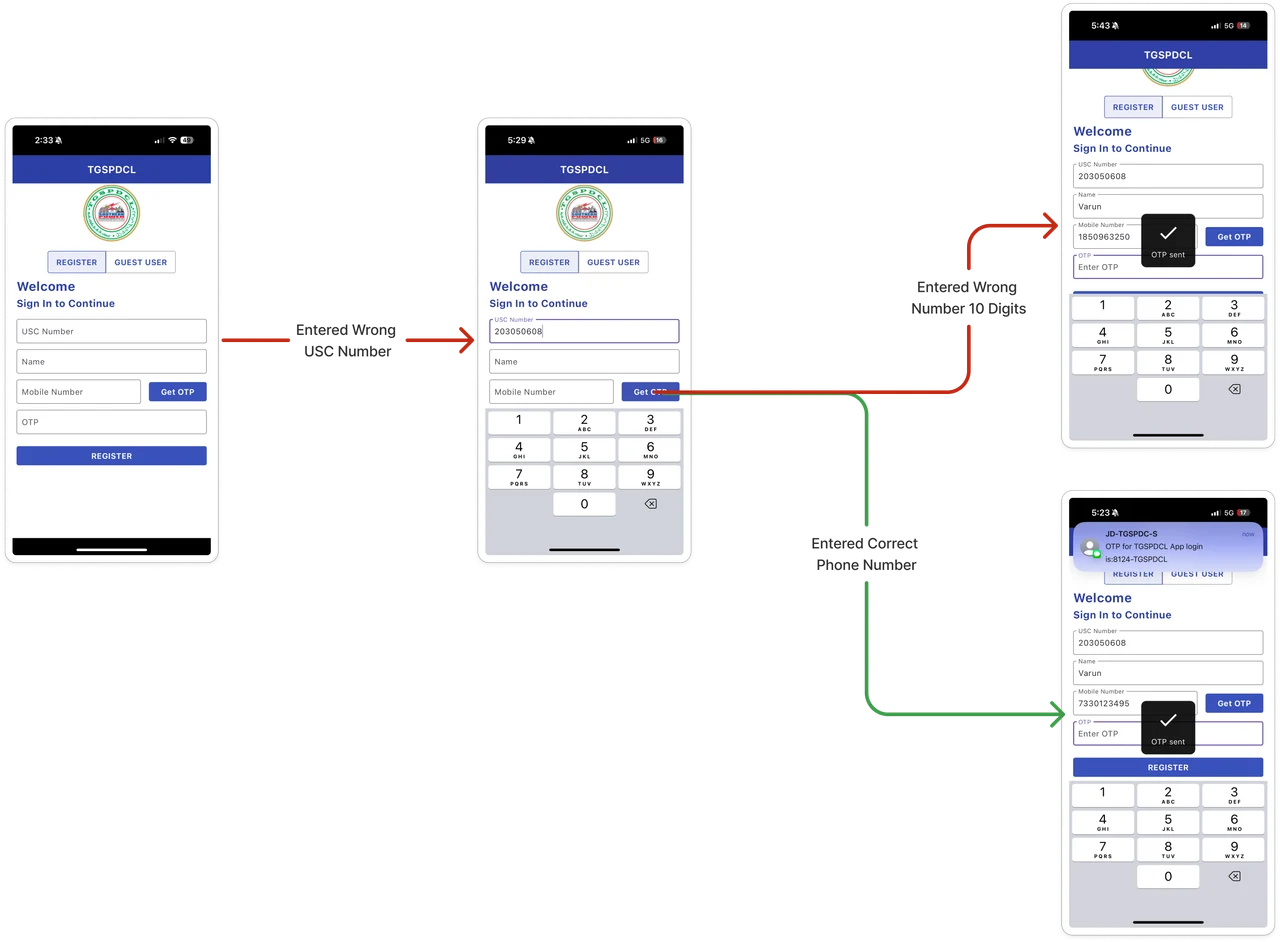
Illustration accompanying Start with the ideal flow, but don’t map it blindly. While mapping, also consider decision points, error states, edge cases, empty states, back flows, and connected flows. This helps you capture the real experience, not just the correct steps.

Start with the ideal flow, but don’t map it blindly. While mapping, also consider decision points, error states, edge cases, empty states, back flows, and connected flows.

This helps you capture the real experience, not just the correct steps.

Swipe to explore the complete figure

Illustration accompanying Start with the ideal flow, but don’t map it blindly. While mapping, also consider decision points, error states, edge cases, empty states, back flows, and connected flows. This helps you capture the real experience, not just the correct steps.

Flow mapping shows how the software really works

Flow mapping helps us identify user paths and UX gaps, but also how different flows or modules are connected.

​

It shows where one task leads into another, helping us understand the software as a complete experience.


Flow mapping shows how the software really works: Inter connection between modules Flow gaps User paths

Inter connection between modules

Flow mapping shows how the software really works: Inter connection between modules Flow gaps User paths

Flow gaps

Flow mapping shows how the software really works: Inter connection between modules Flow gaps User paths

User paths

Flow mapping shows how the software really works

Flow mapping helps us identify user paths and UX gaps, but also how different flows or modules are connected.

It shows where one task leads into another, helping us understand the software as a complete experience.

Flow mapping shows how the software really works: Inter connection between modules Flow gaps User paths


Inter connection between modules

Flow mapping shows how the software really works: Inter connection between modules Flow gaps User paths

Flow gaps

Flow mapping shows how the software really works: Inter connection between modules Flow gaps User paths

User paths

Flow mapping shows how the software really works

Flow mapping helps us identify user paths and UX gaps, but also how different flows or modules are connected.

It shows where one task leads into another, helping us understand the software as a complete experience.

Flow mapping shows how the software really works: Inter connection between modules Flow gaps User paths

Inter connection between modules

Flow mapping shows how the software really works: Inter connection between modules Flow gaps User paths

Flow gaps

Flow mapping shows how the software really works: Inter connection between modules Flow gaps User paths

User paths

Example

In the TG Electricity app, After lodging a complaint, the user naturally wants to check what happened next.

So the complaint submission flow and complaint status flow cannot be treated separately.

They are connected.

​

That connection should be shown in the visual userflow using dotted arrows.

Illustration accompanying Example

Example

In the TG Electricity app, After lodging a complaint, the user naturally wants to check what happened next.

So the complaint submission flow and complaint status flow cannot be treated separately.

They are connected.

That connection should be shown in the visual userflow using dotted arrows.

Illustration accompanying Example

Example

In the TG Electricity app, After lodging a complaint, the user naturally wants to check what happened next.

So the complaint submission flow and complaint status flow cannot be treated separately.

They are connected.

That connection should be shown in the visual userflow using dotted arrows.
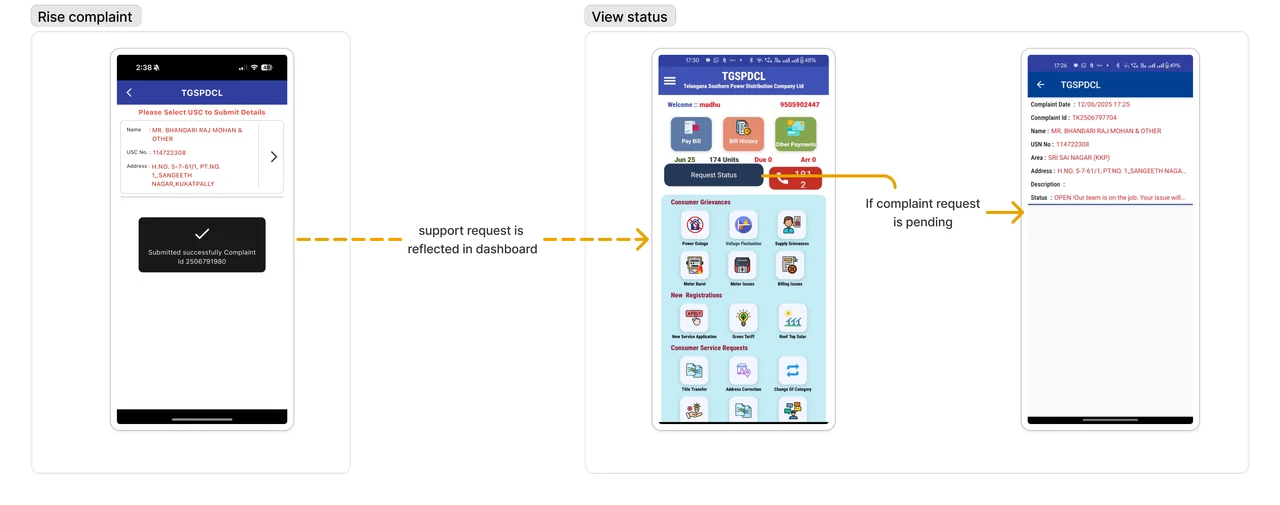
Swipe to explore the complete figure

Illustration accompanying Example

Step 4: Identify the Purpose of the Flow

Step 4
Identify the Purpose of the Flow

Understand the goal behind the task.

This is one of the most important parts of visual userflow mapping.

What is the user doing on this screen?

Understand the goal behind the task.: What is the user doing on this screen? Why is the user doing this?

Why is the user doing this?

Understand the goal behind the task.

This is one of the most important parts of visual userflow mapping.

What is the user doing on this screen?

Understand the goal behind the task.: What is the user doing on this screen? Why is the user doing this?

Why is the user doing this?

Understand the goal behind the task.

This is one of the most important parts of visual userflow mapping.

What is the user doing on this screen?

Understand the goal behind the task.: What is the user doing on this screen? Why is the user doing this?

Why is the user doing this?

What is the user doing on this screen?

Understand the goal behind the task.: What is the user doing on this screen? Why is the user doing this?

Why is the user doing this?

Example

The purpose of login is not just to enter the app. The real purpose may be:

To pay a bill, To lodge a complaint, To check complaint status, To request a service, To view bill history

When the purpose is clear, the redesign becomes more focused.

Pay a Bill

Lodge a Complaint

Check Complaint Status

Add Service

View Bill History

To Request a Service

Example: Pay a Bill Lodge a Complaint Check Complaint Status Add Service View Bill History To Request a Service

Example

The purpose of login is not just to enter the app. The real purpose may be:

To pay a bill, To lodge a complaint, To check complaint status, To request a service, To view bill history

When the purpose is clear, the redesign becomes more focused.

Pay a Bill

Lodge a Complaint

Check Complaint Status

Add Service

View Bill History

To Request a Service

Example: Pay a Bill Lodge a Complaint Check Complaint Status Add Service View Bill History To Request a Service

Example

The purpose of login is not just to enter the app. The real purpose may be:

To pay a bill, To lodge a complaint, To check complaint status, To request a service, To view bill history

When the purpose is clear, the redesign becomes more focused.
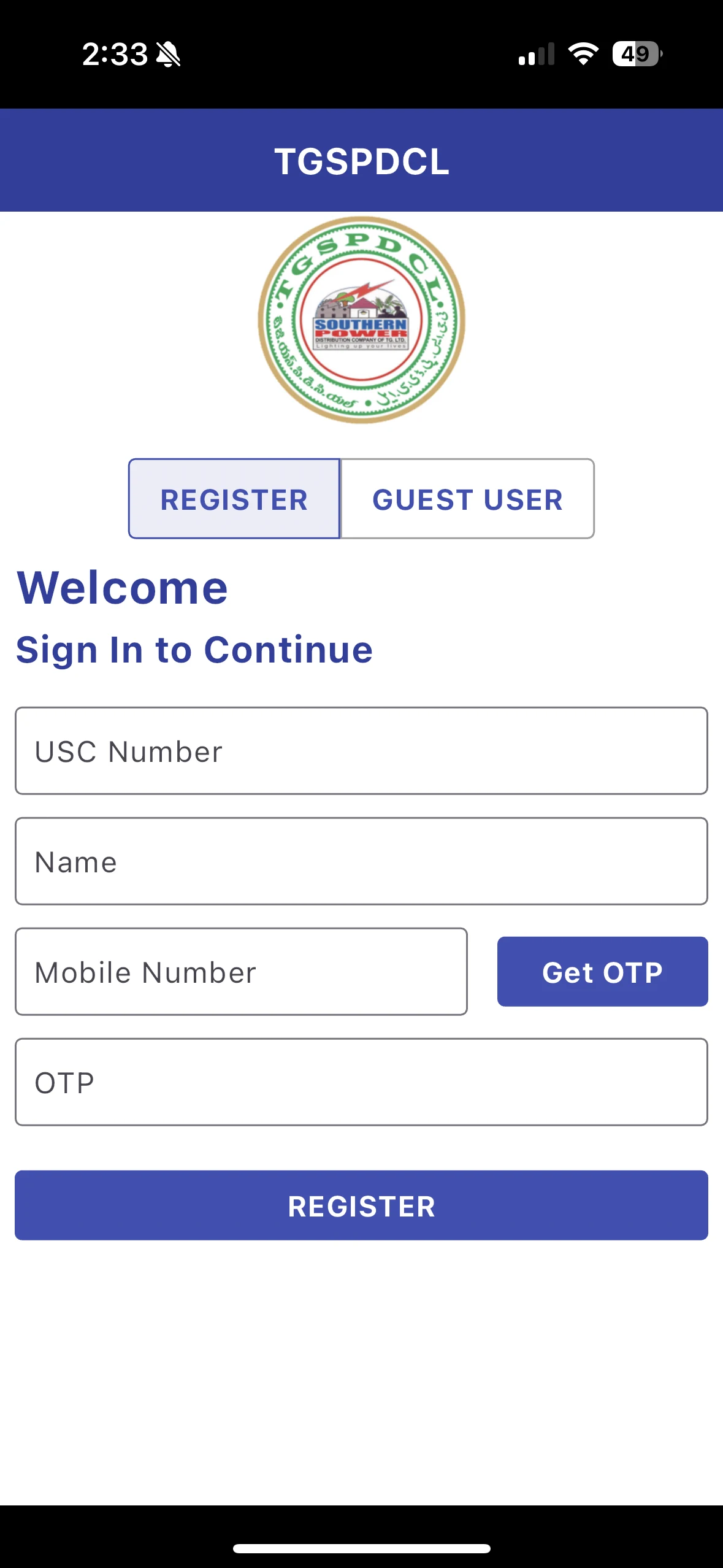
Swipe to explore the complete figure

Pay a Bill

Lodge a Complaint

Check Complaint Status

Add Service

View Bill History

To Request a Service

Example: Pay a Bill Lodge a Complaint Check Complaint Status Add Service View Bill History To Request a Service

Understanding the Purpose Helps Set Priority in the Redesign

Once the purpose of the flow is clear, it becomes easier to decide what should be prioritized in the redesign.

​

The most important user goal should get more focus, while secondary actions should not add unnecessary friction.


Illustration accompanying Understanding the Purpose Helps Set Priority in the Redesign

Understanding the Purpose Helps Set Priority in the Redesign

Once the purpose of the flow is clear, it becomes easier to decide what should be prioritized in the redesign.

The most important user goal should get more focus, while secondary actions should not add unnecessary friction.

Illustration accompanying Understanding the Purpose Helps Set Priority in the Redesign

Understanding the Purpose Helps Set Priority in the Redesign

Once the purpose of the flow is clear, it becomes easier to decide what should be prioritized in the redesign.

The most important user goal should get more focus, while secondary actions should not add unnecessary friction.

Illustration accompanying Understanding the Purpose Helps Set Priority in the Redesign

Step 5: Identify Input Dependencies

Step 5
Identify Input Dependencies
Identify What Each Input Depends On: Document Previous Step Approval Record Role permission

Document

Previous Step

Approval

Record

Role permission

Identify What Each Input Depends On

After understanding the purpose of the flow, identify what information the user needs to complete it.

​

Every input depends on something
a document, previous step, approval, record, or role permission.

If these dependencies are missed, users may reach a step but not have the information needed to complete the task.

Illustration accompanying Identify What Each Input Depends On

Identify What Each Input Depends On

After understanding the purpose of the flow, identify what information the user needs to complete it.

Every input depends on something a document, previous step, approval, record, or role permission. If these dependencies are missed, users may reach a step but not have the information needed to complete the task.

Identify What Each Input Depends On: Document Previous Step Approval Record Role permission

Document

Previous Step

Approval

Record

Role permission

Illustration accompanying Identify What Each Input Depends On

Identify What Each Input Depends On

After understanding the purpose of the flow, identify what information the user needs to complete it.

Every input depends on something a document, previous step, approval, record, or role permission. If these dependencies are missed, users may reach a step but not have the information needed to complete the task.

Swipe to explore the complete figure

Identify What Each Input Depends On: Document Previous Step Approval Record Role permission

Document

Previous Step

Approval

Record

Role permission

Illustration accompanying Identify What Each Input Depends On

If these dependencies are ignored, users get stuck.

Illustration accompanying If these dependencies are ignored, users get stuck.

If these dependencies are ignored, users get stuck.

Illustration accompanying If these dependencies are ignored, users get stuck.

If these dependencies are ignored, users get stuck.

Illustration accompanying If these dependencies are ignored, users get stuck.

Identifying input dependencies helps the design team create better

When input dependencies are clear, the design team knows what the user needs before they can complete a step. This helps the redesign reduce confusion and make the flow easier to complete.

Identifying input dependencies helps the design team create better: field labels helper text validation flow structure next-step clarity guidance

field labels

helper text

validation

flow structure

next-step clarity

guidance

Identifying input dependencies helps the design team create better

When input dependencies are clear, the design team knows what the user needs before they can complete a step. This helps the redesign reduce confusion and make the flow easier to complete.

field labels

helper text

validation

flow structure

next-step clarity

guidance

Identifying input dependencies helps the design team create better

When input dependencies are clear, the design team knows what the user needs before they can complete a step. This helps the redesign reduce confusion and make the flow easier to complete.

field labels

helper text

validation

flow structure

next-step clarity

guidance

FRAMEWORK CONTENTS

Visual Flow Framework

Search documentation

Search scope

Search across all eight guides.

Diagram detail