

UX Audit Framework · CHAPTER 4 OF 6
Evaluating data and workflows

Study the Data Used in the Flow


Data Study Helps Find Better Solutions.
Data Study Helps Find Better Solutions.
Identify the Main Data Points.
For the registered-user login flow, users enter:
- USC Number
- Name
- Mobile Number
- OTP
Start with the first required input and study it properly.

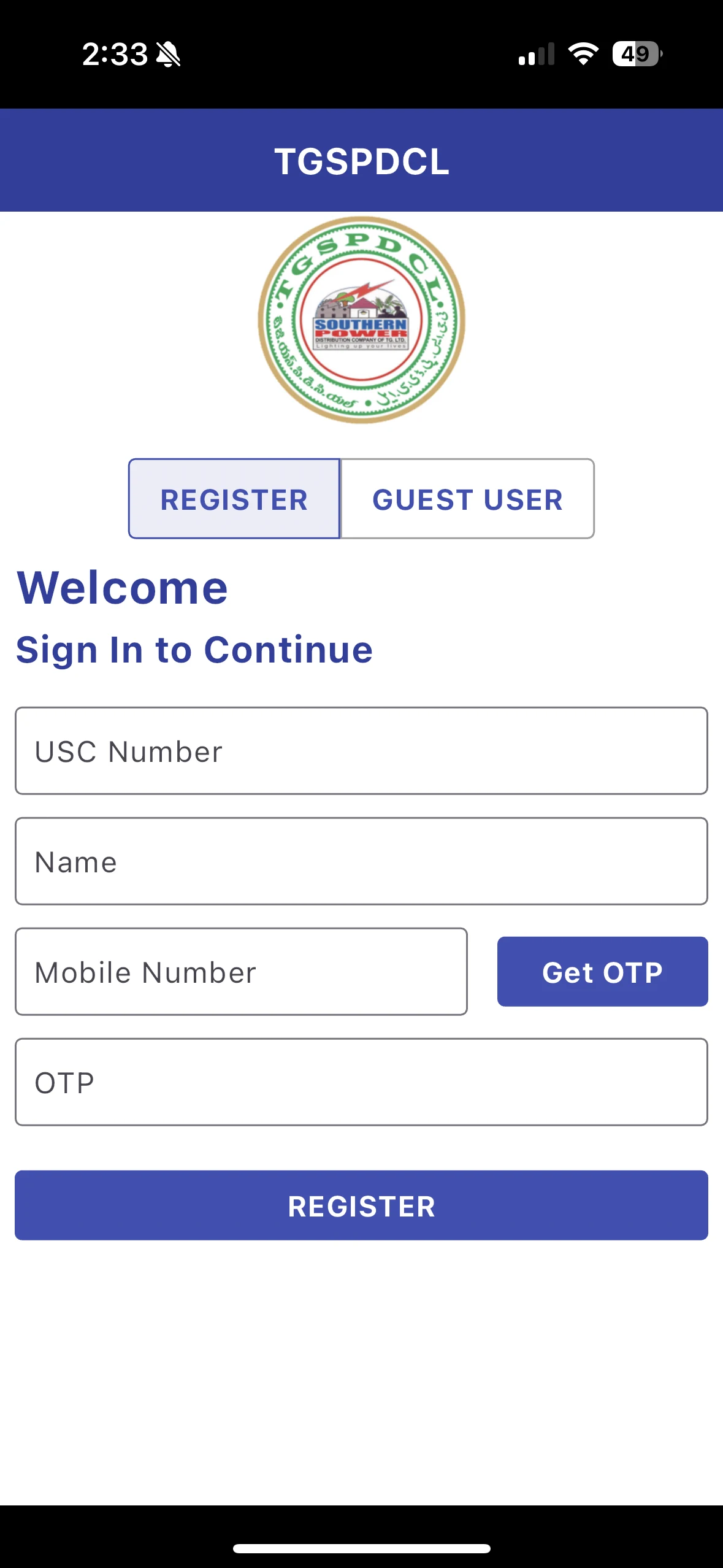
Identify the Main Data Points.
For the registered-user login flow, users enter:
- USC Number
- Name
- Mobile Number
- OTP
Start with the first required input and study it properly.
Always Write the Full Form.
When using abbreviations, write the full form.
Example:
USC — Unique Service Number
This gives context, makes the audit easier to understand, and helps other team members refer to it later.

1
Lack of clarity
What is USC number where can i find it


1
USC Number (Unified Service Connection Number)
A unique identifier assigned to electricity consumers by the Telangana State Southern Power Distribution Company Limited (TSSPDCL).
Always Write the Full Form.
When using abbreviations, write the full form.
Example:
USC — Unique Service Number
This gives context, makes the audit easier to understand, and helps other team members refer to it later.
1
Lack of clarity
What is USC number where can i find it
1
USC Number (Unified Service Connection Number)
A unique identifier assigned to electricity consumers by the Telangana State Southern Power Distribution Company Limited (TSSPDCL).
Document the Format.
Format tells us what kind of input users need to enter.
Ask:
Is it numbers, letters, or both?
Is there a character limit?
Is there a specific format?
Example:
USC number is a 9-digit number.
This can influence helper text, placeholders, input restrictions, and validation messages.
Document the Format.
Format tells us what kind of input users need to enter.
Ask:
Is it numbers, letters, or both?
Is there a character limit?
Is there a specific format?
Example:
USC number is a 9-digit number.
This can influence helper text, placeholders, input restrictions, and validation messages.
Document the Source.
Source tells us where users can find the information.
Example:
Users can find the USC number on their electricity bill.
But if users do not know where it appears on the bill, the interface should guide them visually.

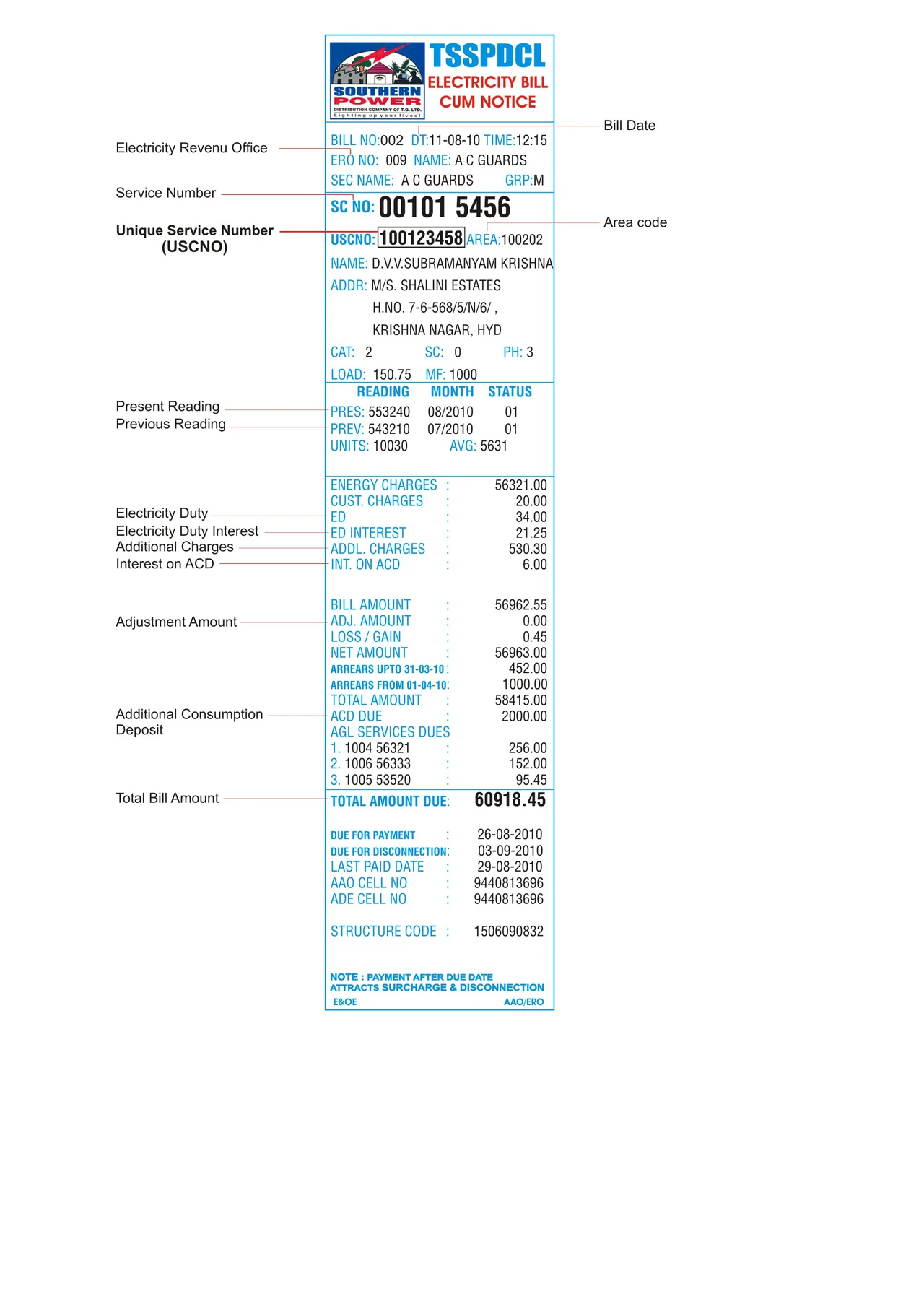

Document the Source.
Source tells us where users can find the information.
Example:
Users can find the USC number on their electricity bill.
But if users do not know where it appears on the bill, the interface should guide them visually.








Document the Purpose.
Document the Purpose.
Document Dependencies.
Dependencies show which tasks rely on the same data.
Example:
Users need the USC number before they can pay a bill, view bill details, check payment history, register a connection, or request services.
This shows how one data point affects the complete journey.
Document Dependencies.
Dependencies show which tasks rely on the same data.
Example:
Users need the USC number before they can pay a bill, view bill details, check payment history, register a connection, or request services.
This shows how one data point affects the complete journey.
Small Details Lead to Strong Design Decisions.
Small Details Lead to Strong Design Decisions.
Identify What Is Working and What Is Not





Now Start Documenting Audit Points.
Now Start Documenting Audit Points.
Example:
Registered vs Guest User Confusion
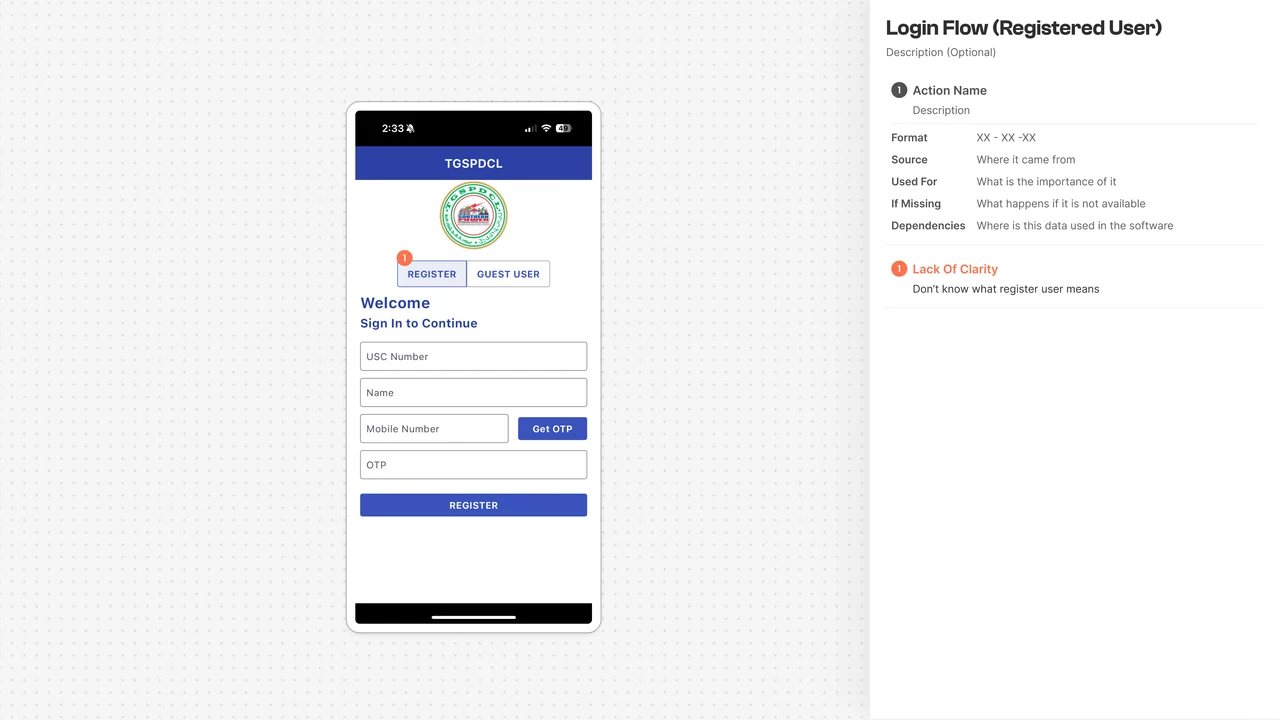
From the visual user flow and user persona steps, the difference between Registered User and Guest User is unclear.
Users may not know which option they should select.
Mark this as red: To Be Fixed

1
To Be Fixed
Example: Registered vs Guest User Confusion
From the visual user flow and user persona steps, the difference between Registered User and Guest User is unclear.
Users may not know which option they should select.
Mark this as red: To Be Fixed
1
To Be Fixed
Example:
Weak Visual Hierarchy
The text “Welcome, sign in to continue” does not clearly show what users should notice first.
The spacing and font hierarchy need improvement.
Mark this as red: To Be Fixed
2
2
Visual Hierarchy
The Hierarchy of “welcome” and sign in continue needs to be fixed as it lacks priority on what needs to be looked at first, especially with the spacking as well
To Be Fixed
Example: Weak Visual Hierarchy
The text “Welcome, sign in to continue” does not clearly show what users should notice first.
The spacing and font hierarchy need improvement.
Mark this as red: To Be Fixed
2
2
Visual Hierarchy
The Hierarchy of “welcome” and sign in continue needs to be fixed as it lacks priority on what needs to be looked at first, especially with the spacking as well
To Be Fixed
Do Not Repeat the Same UI Issue Again and Again.
If the same UI issue appears across multiple screens, document it only once.
For example, if heading hierarchy is weak across the product, it can later be corrected through the design system.

Do Not Repeat the Same UI Issue Again and Again.
If the same UI issue appears across multiple screens, document it only once.
For example, if heading hierarchy is weak across the product, it can later be corrected through the design system.
Example:
USC Number Needs Guidance.
Users are not properly guided about what the USC number is or where they can find it.
Since this can stop users from continuing, it becomes a major usability issue.
Mark this as red: To Be Fixed

3
3
No mention of USC Source
If I lost my electricity bill and don’t know my USC number, even as a guest user I would not know
To Be Fixed
Example: USC Number Needs Guidance.
Users are not properly guided about what the USC number is or where they can find it.
Since this can stop users from continuing, it becomes a major usability issue.
Mark this as red: To Be Fixed
3
3
No mention of USC Source
If I lost my electricity bill and don’t know my USC number, even as a guest user I would not know
To Be Fixed
Example:
Name Field Lacks Context.
It is unclear whose name should be entered.
Should users enter the name of the person using the app?
Or the name of the electricity connection owner?
This becomes important when tenants pay bills for properties registered under the owner’s name.
To Be Fixed
4
4
Lack of Context
It is unclear whose name to write.
Mine or the home owner’s. Same with phone number
Example: Name Field Lacks Context.
It is unclear whose name should be entered.
Should users enter the name of the person using the app?
Or the name of the electricity connection owner?
This becomes important when tenants pay bills for properties registered under the owner’s name.
To Be Fixed
4
4
Lack of Context
It is unclear whose name to write.
Mine or the home owner’s. Same with phone number
Example:
No Resend OTP Option.
Some users may face poor network connectivity or delayed OTP delivery.
But if there is no resend option, they may not be able to complete the task.
Mark this as red: To Be Fixed
5
To Be Fixed
5
Resend OTP option missing
What happens if I did not receive OTP? No resend option as such
Example: No Resend OTP Option.
Some users may face poor network connectivity or delayed OTP delivery.
But if there is no resend option, they may not be able to complete the task.
Mark this as red: To Be Fixed
5
To Be Fixed
5
Resend OTP option missing
What happens if I did not receive OTP? No resend option as such
Example:
OTP Input Can Be Improved.
The current OTP input does not clearly show how many digits users need to enter.
This can be marked as orange: To Be Improved
A possible solution is to show separate OTP boxes.
Mark that as blue: Ideas

To Be Improved
6
6
OTP Input Field
Giving an input field for OTP makes it little more difficult to check if all numbers are entered (how many are there?)
Idea
6
6
OTP boxes
Give 4 boxes for OTP
Example: OTP Input Can Be Improved.
The current OTP input does not clearly show how many digits users need to enter.
This can be marked as orange: To Be Improved
A possible solution is to show separate OTP boxes.
Mark that as blue: Ideas
To Be Improved
6
6
OTP Input Field
Giving an input field for OTP makes it little more difficult to check if all numbers are entered (how many are there?)
Idea
6
6
OTP boxes
Give 4 boxes for OTP
Example:
Buttons Are Active Too Early.
Register and Get OTP appear active even when no information has been entered.
These buttons should remain disabled until the required fields are filled.
Mark this as red: To Be Fixed
7
To Be Fixed
7
Button is by default active
Register and Get OTP appear active even when no information has been entered.
Example: Buttons Are Active Too Early.
Register and Get OTP appear active even when no information has been entered.
These buttons should remain disabled until the required fields are filled.
Mark this as red: To Be Fixed
7
To Be Fixed
7
Button is by default active
Register and Get OTP appear active even when no information has been entered.
Multi-Connection Clarity Is Missing.
Some users may need to pay multiple electricity bills. For example,
one for their home and another for a rented office.
But the login experience does not explain whether multiple connections can be managed.
This should be documented as a clarity gap.
8
To Be Fixed
8
Multiple USC Numbers
No option for the user to add multiple USC numbers. There is no indication that such feature exists, or that more can be added later
Multi-Connection Clarity Is Missing.
Some users may need to pay multiple electricity bills. For example, one for their home and another for a rented office.
But the login experience does not explain whether multiple connections can be managed.
This should be documented as a clarity gap.
8
To Be Fixed
8
Multiple USC Numbers
No option for the user to add multiple USC numbers. There is no indication that such feature exists, or that more can be added later
Identify What Is Already Good.
Requesting OTP and completing registration are two different system actions.
The current software separates these actions.
This should be marked as green: Good
Good patterns should be retained or improved, not removed blindly.

Good
9
9
OTP & Register
Receiving OTP and register actions are separated, which is a good think. We can enhance that separation of action.
Identify What Is Already Good.
Requesting OTP and completing registration are two different system actions.
The current software separates these actions.
This should be marked as green: Good
Good patterns should be retained or improved, not removed blindly.
Good
9
9
OTP & Register
Receiving OTP and register actions are separated, which is a good think. We can enhance that separation of action.