

First Principles of SaaS UX · CHAPTER 6 OF 7
Privacy, access, and flexible navigation

Data Privacy
Data Should Follow User Access
Users Should Only See Relevant Information
Data privacy means ensuring users can access only the information required for their role and tasks.
For example:
Patient: Only their own records
Nurse: Clinical information but not billing details


Data Should Follow User Access
Users Should Only See Relevant Information
Data privacy means ensuring users can access only the information required for their role and tasks.
For example:
Patient: Only their own records
Nurse: Clinical information but not billing details

Role-based access is essential when designing complex software.
Role-based access is essential when designing complex software.
Flexible Navigation






Users Don’t Always Follow the Perfect Path
Users Don’t Always Follow the Perfect Path
Example: Home Automation
Change Decisions Without Restarting
A user selects: Device Trigger
But later realises they need: Device Time Trigger
Instead of restarting the entire flow, they can switch the option directly from the dropdown.



Device Trigger
Trigger device manually

Manual Trigger
Turn off all the lights in the bedroom with one tap
Device & Time Trigger
Change the behaviour of the device in terms of device or time
Time Trigger
Ex: Schedule 6.00am every morning
Sensor Trigger
Trigger devices when your around


Example: Home Automation
Change Decisions Without Restarting
A user selects: Device Trigger
But later realises they need: Device Time Trigger
Instead of restarting the entire flow, they can switch the option directly from the dropdown.
Device Trigger
Trigger device manually
Manual Trigger
Turn off all the lights in the bedroom with one tap
Device & Time Trigger
Change the behaviour of the device in terms of device or time
Time Trigger
Ex: Schedule 6.00am every morning
Sensor Trigger
Trigger devices when your around
Example: Figma
Preserve Previous Work While Changing Decisions
In Figma, a user can switch:
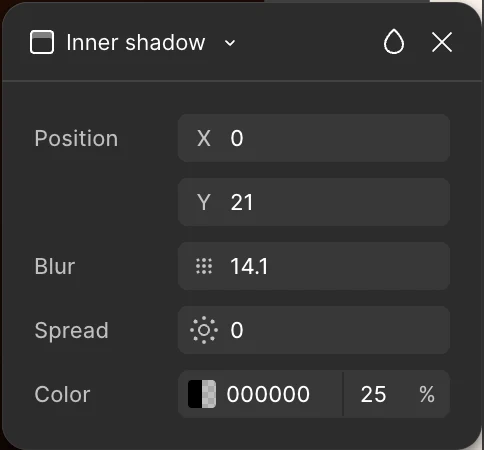
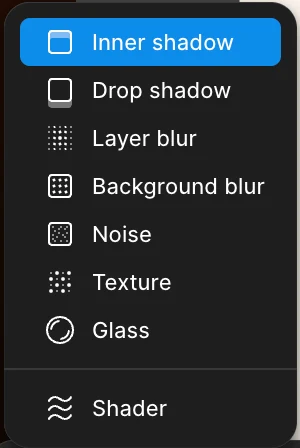
Inner Shadow to Drop Shadow without removing the effect and configuring everything again.
The properties adjust automatically. This allows users to change decisions without starting over.


Example: Figma
Preserve Previous Work While Changing Decisions
In Figma, a user can switch:
Inner Shadow to Drop Shadow without removing the effect and configuring everything again.
The properties adjust automatically. This allows users to change decisions without starting over.
The Core Principle
Good information hierarchy ensures users get:
The right information - At the right time - With the right level of access
Combined with privacy and flexible navigation, it creates software that supports real workflows instead of forcing users to adapt to the system.


The Core Principle
Good information hierarchy ensures users get:
The right information - At the right time - With the right level of access
Combined with privacy and flexible navigation, it creates software that supports real workflows instead of forcing users to adapt to the system.