First Principles of SaaS UX · CHAPTER 5 OF 7

Information hierarchy and disclosure

Step - 3

Set Information Hierarchy

Step - 3

Set Information Hierarchy

Set Information Hierarchy

After understanding the data and setting priorities, we need to organize information around the user's task.

The goal is to bring the right information together, in the right place, at the right time, so users can complete their tasks efficiently.

Illustration accompanying Set Information Hierarchy

Set Information Hierarchy
After understanding the data and setting priorities, we need to organize information around the user's task. The goal is to bring the right information together, in the right place, at the right time, so users can complete their tasks efficiently.

Illustration accompanying Set Information Hierarchy

What Information Does the User Need?

Every action in software depends on a certain set of information.

What does the user need to know to complete this action?

What Information Does the User Need?: What does the user need to know to complete this action?

So Before Designing A Screen, Ask:

What Information Does the User Need?

Every action in software depends on a certain set of information.

What does the user need to know to complete this action?

What Information Does the User Need?: What does the user need to know to complete this action?

So Before Designing A Screen, Ask:

Actions Depend on the Right Information

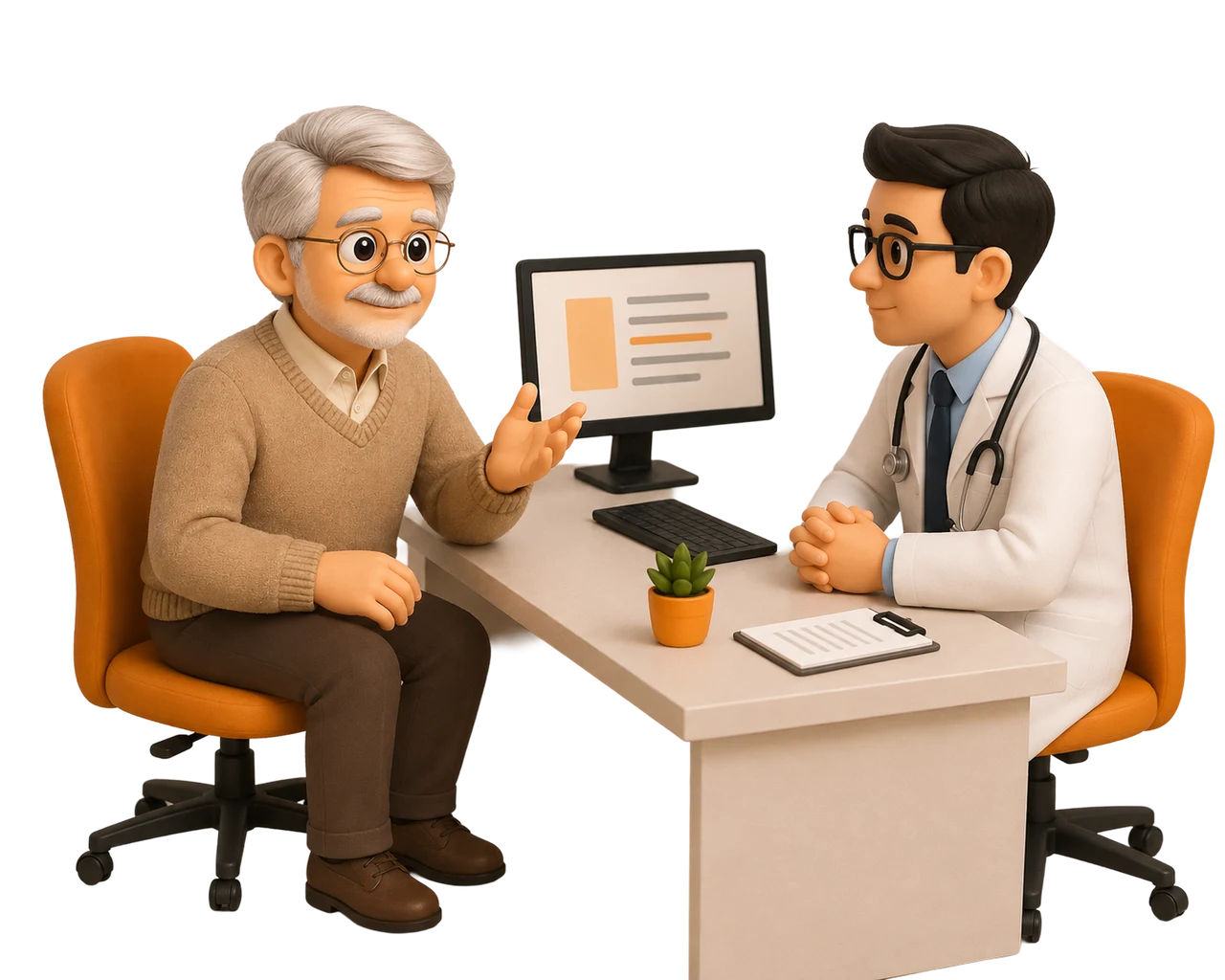
For a doctor to write a prescription, they may need:

Patient Details, Medical History, Symptoms, Temperature, Blood Pressure

​

This information helps them understand the patient, make a diagnosis, and prescribe treatment.

Apedermin dexolite

minoxidil one mg

Apedermin dexolite ck urite

mioxidil tablets

Apedermin dexolite

Apedermin dexolite

Doctor prescrition

Name:

Age

Gender

Actions Depend on the Right Information: Apedermin dexolite minoxidil one mg Apedermin dexolite ck urite mioxidil tablets Apedermin dexolite Apedermin dexolite Doctor prescrition Name: Age Gender Patient Details Medical History Symptoms

Patient Details

Medical History

Symptoms

Actions Depend on the Right Information

For a doctor to write a prescription, they may need:

Patient Details, Medical History, Symptoms, Temperature, Blood Pressure

This information helps them understand the patient, make a diagnosis, and prescribe treatment.

Apedermin dexolite

minoxidil one mg

Apedermin dexolite ck urite

mioxidil tablets

Apedermin dexolite

Apedermin dexolite

Doctor prescrition

Name:

Age

Gender

Actions Depend on the Right Information: Apedermin dexolite minoxidil one mg Apedermin dexolite ck urite mioxidil tablets Apedermin dexolite Apedermin dexolite Doctor prescrition Name: Age Gender Patient Details Medical History Symptoms

Patient Details

Medical History

Symptoms

Missing Information Makes Tasks Harder

When required information is missing, scattered, or difficult to access, users spend more time searching and moving between screens.

​

This can increase: Time on Task, Cognitive Load, Human Error, Unnecessary Clicks, Rework

Missing Information Makes Tasks Harder: Time on Task Human Error Cognitive Load Rework Unnecessary Clicks

Time on Task

Missing Information Makes Tasks Harder: Time on Task Human Error Cognitive Load Rework Unnecessary Clicks

Human Error

Missing Information Makes Tasks Harder: Time on Task Human Error Cognitive Load Rework Unnecessary Clicks

Cognitive Load

Missing Information Makes Tasks Harder: Time on Task Human Error Cognitive Load Rework Unnecessary Clicks

Rework

Missing Information Makes Tasks Harder: Time on Task Human Error Cognitive Load Rework Unnecessary Clicks

Unnecessary Clicks

Missing Information Makes Tasks Harder: Time on Task Human Error Cognitive Load Rework Unnecessary Clicks

Missing Information Makes Tasks Harder

When required information is missing, scattered, or difficult to access, users spend more time searching and moving between screens.

This can increase: Time on Task, Cognitive Load, Human Error, Unnecessary Clicks, Rework

Missing Information Makes Tasks Harder: Time on Task Human Error Cognitive Load Rework Unnecessary Clicks

Time on Task

Missing Information Makes Tasks Harder: Time on Task Human Error Cognitive Load Rework Unnecessary Clicks

Human Error

Missing Information Makes Tasks Harder: Time on Task Human Error Cognitive Load Rework Unnecessary Clicks

Cognitive Load

Missing Information Makes Tasks Harder: Time on Task Human Error Cognitive Load Rework Unnecessary Clicks

Rework

Missing Information Makes Tasks Harder: Time on Task Human Error Cognitive Load Rework Unnecessary Clicks

Unnecessary Clicks

Look at a Real Example

Radiologists Had Information Across Multiple Screens

​

In RISPACS, radiologists review DICOM scans and write diagnostic reports.

​

But the information they needed to complete the report was spread across different screens.

Illustration accompanying Look at a Real Example

Look at a Real Example

Radiologists Had Information Across Multiple Screens

In RISPACS, radiologists review DICOM scans and write diagnostic reports.

But the information they needed to complete the report was spread across different screens.
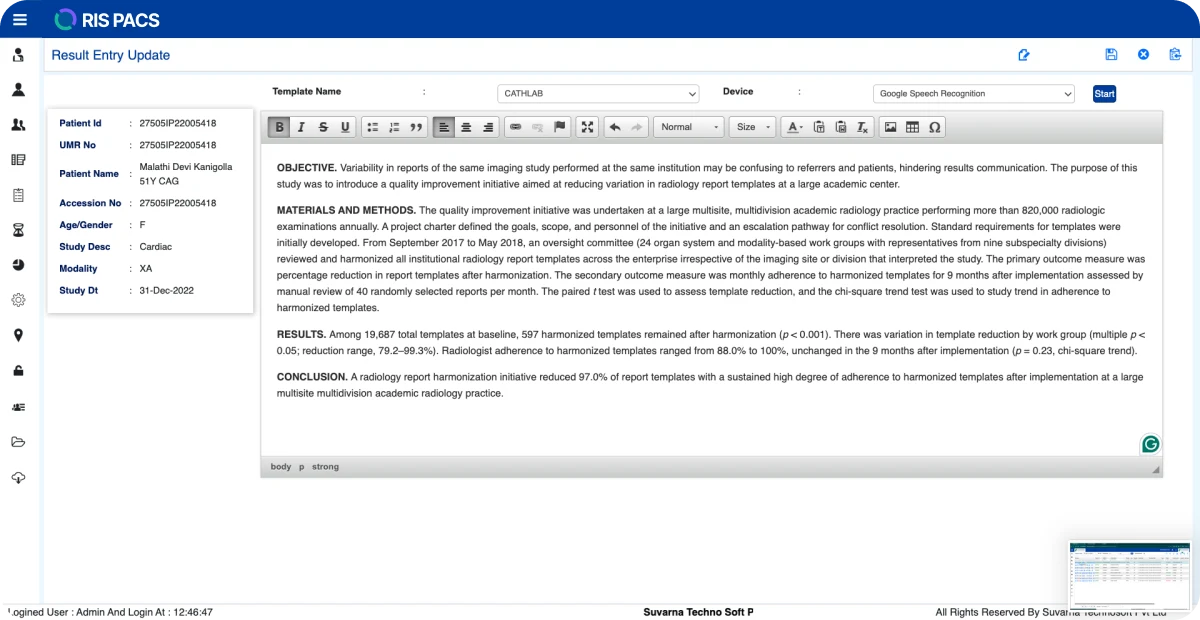
Illustration accompanying Look at a Real Example

Users Shouldn’t Have to Memorize Data

Scattered Data Creates Cognitive Load

​

The radiologist had to remember information from one screen while working on another.

​

This meant more: Searching, Remembering, Switching, Rechecking. Instead of focusing on the actual reporting task.
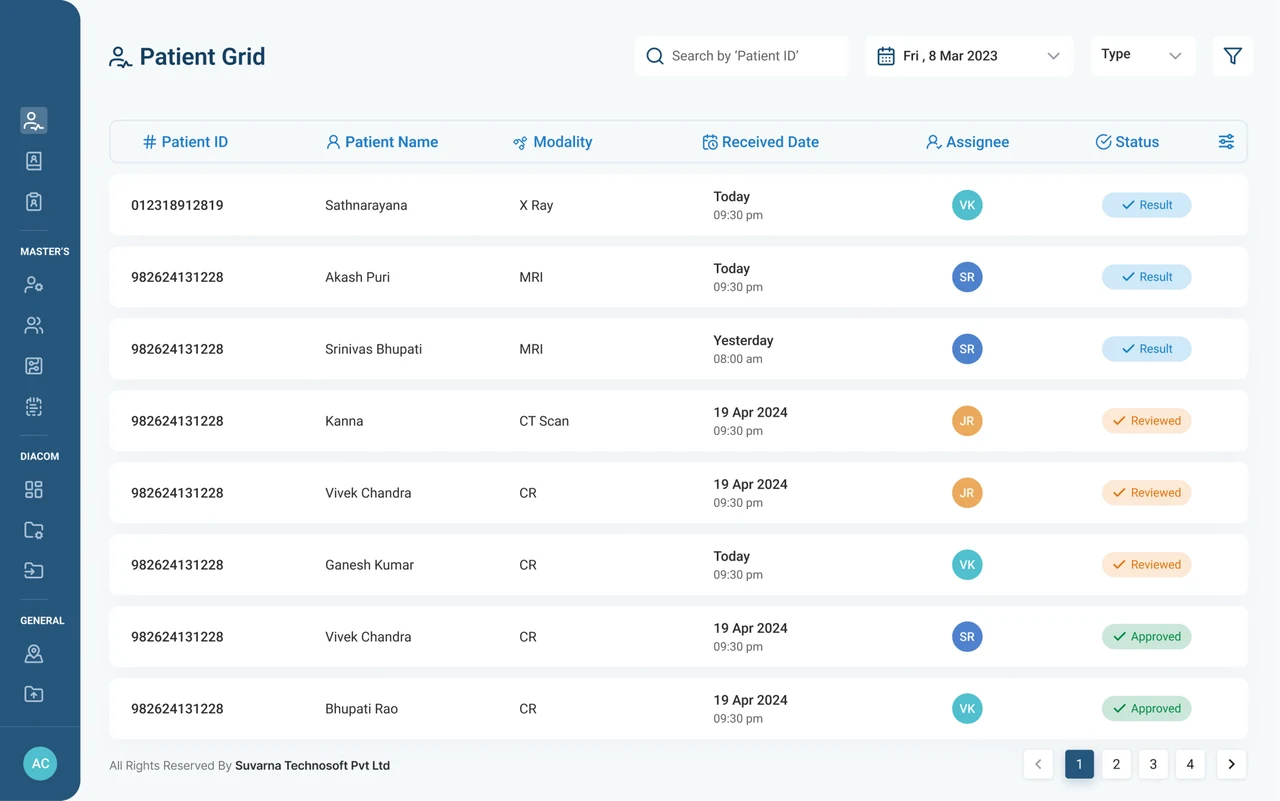

Illustration accompanying Users Shouldn’t Have to Memorize Data

Users Shouldn’t Have to Memorize Data

Scattered Data Creates Cognitive Load

The radiologist had to remember information from one screen while working on another.

This meant more: Searching, Remembering, Switching, Rechecking. Instead of focusing on the actual reporting task.

Illustration accompanying Users Shouldn’t Have to Memorize Data

Start With One Question

What Does the Radiologist Need While Reporting?

​

Using our research and persona understanding, we identified the information required to complete the task: Patient details,DICOM images, patient history, referring doctor details, report-writing canvas
Start With One Question: “What Does the Radiologist Need While Reporting?”

“What Does the Radiologist Need While Reporting?”

Start With One Question

What Does the Radiologist Need While Reporting?

Using our research and persona understanding, we identified the information required to complete the task: Patient details,DICOM images, patient history, referring doctor details, report-writing canvas

Start With One Question: “What Does the Radiologist Need While Reporting?”

“What Does the Radiologist Need While Reporting?”

Don’t Show Everything at Once

Show Information When It Becomes Relevant

​

Once we know what information users need, the next question is:

​

When should they see it?

​

Progressive disclosure helps reveal information based on the user’s current task and stage in the workflow.


Illustration accompanying Don’t Show Everything at Once

Don’t Show Everything at Once

Show Information When It Becomes Relevant

Once we know what information users need, the next question is:

When should they see it?

Progressive disclosure helps reveal information based on the user’s current task and stage in the workflow.

Illustration accompanying Don’t Show Everything at Once

Apply Progressive Disclosure

Showing the Right Information at the Right Time

​

In the old radiology software, multiple information sources were available together, regardless of where the radiologist was in the workflow.

​

Using information hierarchy, we asked:

What information does the radiologist need at this stage?

Illustration accompanying Apply Progressive Disclosure

Apply Progressive Disclosure

Showing the Right Information at the Right Time

In the old radiology software, multiple information sources were available together, regardless of where the radiologist was in the workflow.

Using information hierarchy, we asked:

What information does the radiologist need at this stage?

Illustration accompanying Apply Progressive Disclosure

Information Appears When Needed

Once the radiologist starts reporting, we reveal:

​

  • Patient details
  • DICOM images
  • Patient history
  • Referring doctor details
  • Report-writing canvas

​

Now, all the information required to complete the task is available without user constantly moving between screens.
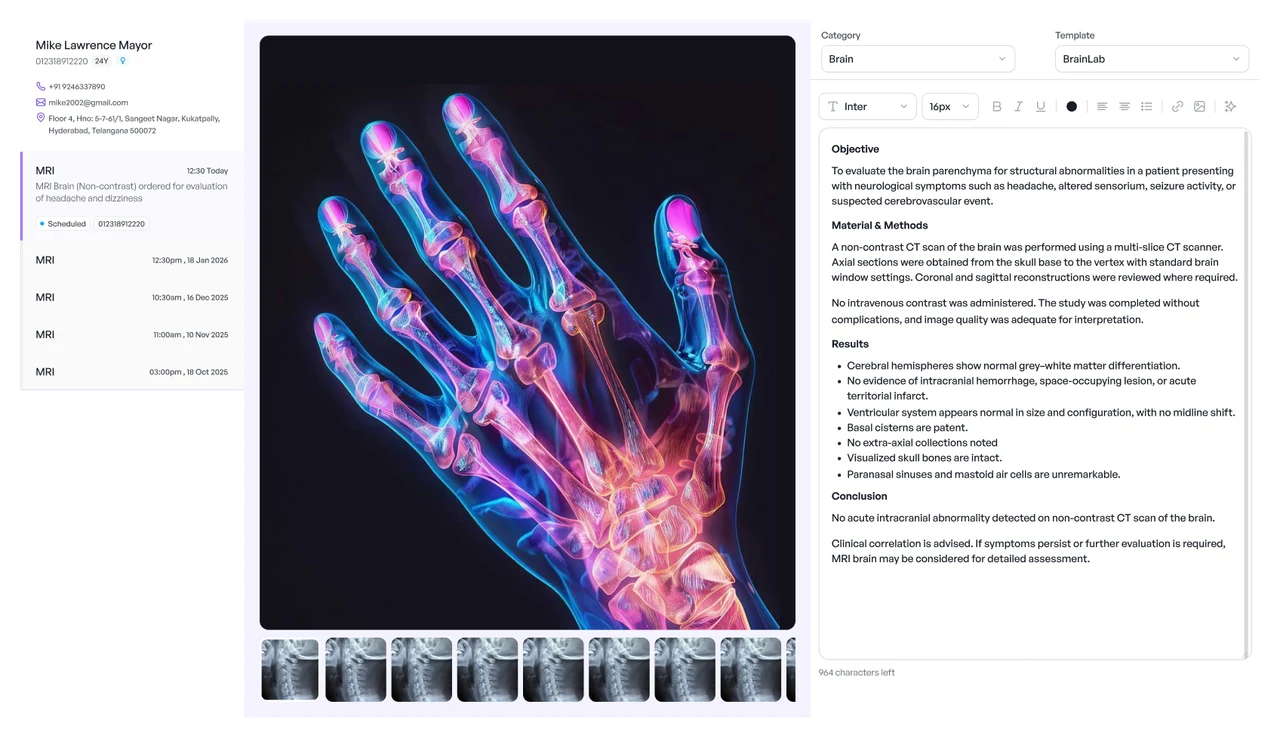

Illustration accompanying Information Appears When Needed

Information Appears When Needed

Once the radiologist starts reporting, we reveal:

  • Patient details
  • DICOM images
  • Patient history
  • Referring doctor details
  • Report-writing canvas

Now, all the information required to complete the task is available without user constantly moving between screens.

Illustration accompanying Information Appears When Needed

Progressive Disclosure Reduces Cognitive Load

Instead of showing: All information at all times

​

We show: The right information at the right stage of the workflow

​

This reduces:

​

  • Clutter
  • Unnecessary navigation
  • Cognitive load

Reduce Clutter

Progressive Disclosure Reduces Cognitive Load: Reduce Clutter Unneeded navigation Cognitive load

Unneeded navigation

Progressive Disclosure Reduces Cognitive Load: Reduce Clutter Unneeded navigation Cognitive load

Cognitive load

Progressive Disclosure Reduces Cognitive Load

Instead of showing: All information at all times

We show: The right information at the right stage of the workflow

This reduces:

  • Clutter
  • Unnecessary navigation
  • Cognitive load

Reduce Clutter

Progressive Disclosure Reduces Cognitive Load: Reduce Clutter Unneeded navigation Cognitive load

Unneeded navigation

Progressive Disclosure Reduces Cognitive Load: Reduce Clutter Unneeded navigation Cognitive load

Cognitive load

Everyday Example: WhatsApp

Information Appears Based on User Intent

​

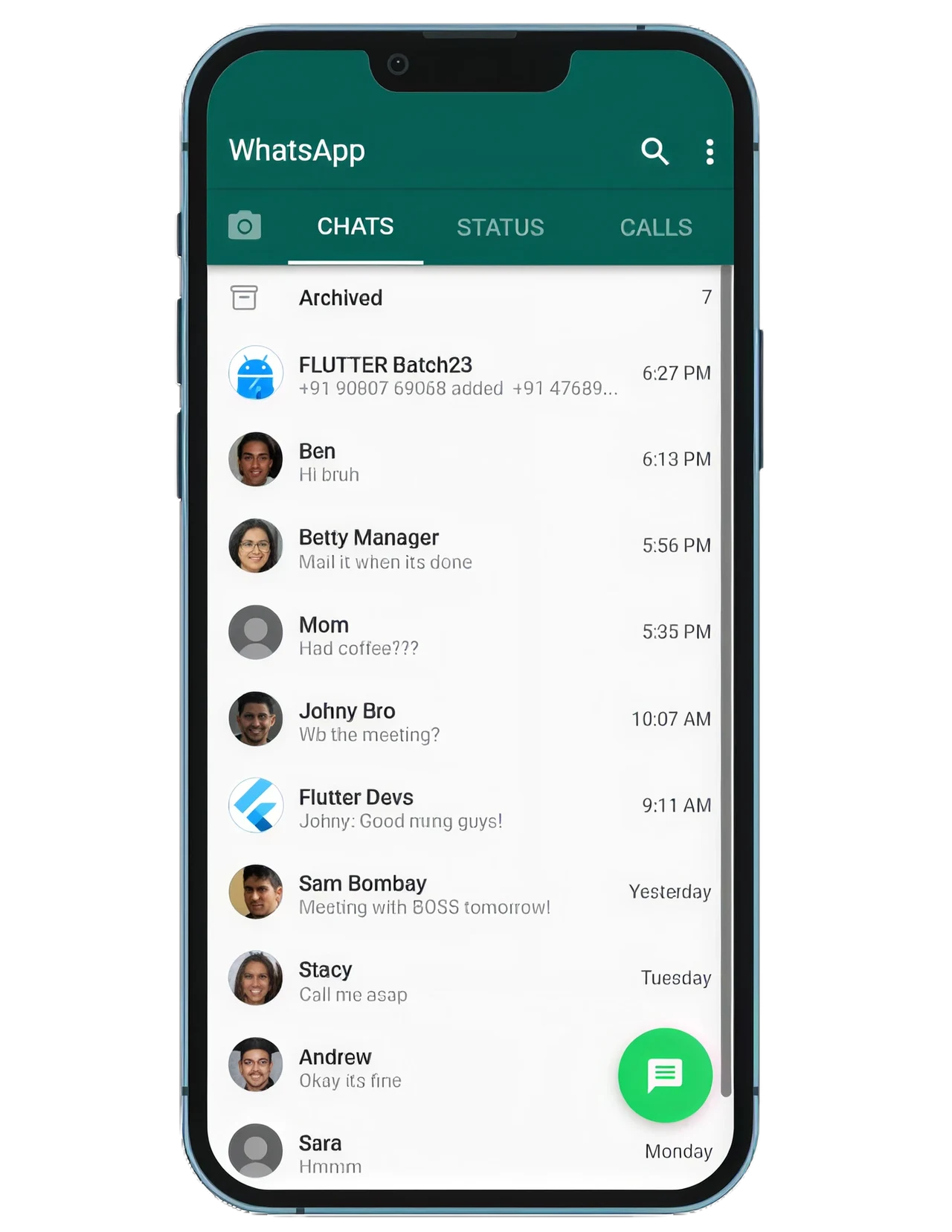
On the WhatsApp Chats screen, users see only what they need to choose a conversation: Profile image, Contact name, Message preview, Time, Unread count

​

The complete conversation appears only after opening the chat.

Illustration accompanying Everyday Example: WhatsApp

Everyday Example: WhatsApp

Information Appears Based on User Intent

On the WhatsApp Chats screen, users see only what they need to choose a conversation: Profile image, Contact name, Message preview, Time, Unread count

The complete conversation appears only after opening the chat.

Illustration accompanying Everyday Example: WhatsApp

Actions Appear When They Become Relevant

WhatsApp reveals additional actions only when needed:

​

Attachment icon → Photos, documents, location

Long press message → Reply, forward, delete, react

Contact name → Profile, media, settings

​

Users get access to everything they need, but not everything at once.

Illustration accompanying Actions Appear When They Become Relevant

Actions Appear When They Become Relevant

WhatsApp reveals additional actions only when needed:

Attachment icon → Photos, documents, location

Long press message → Reply, forward, delete, react

Contact name → Profile, media, settings

Users get access to everything they need, but not everything at once.
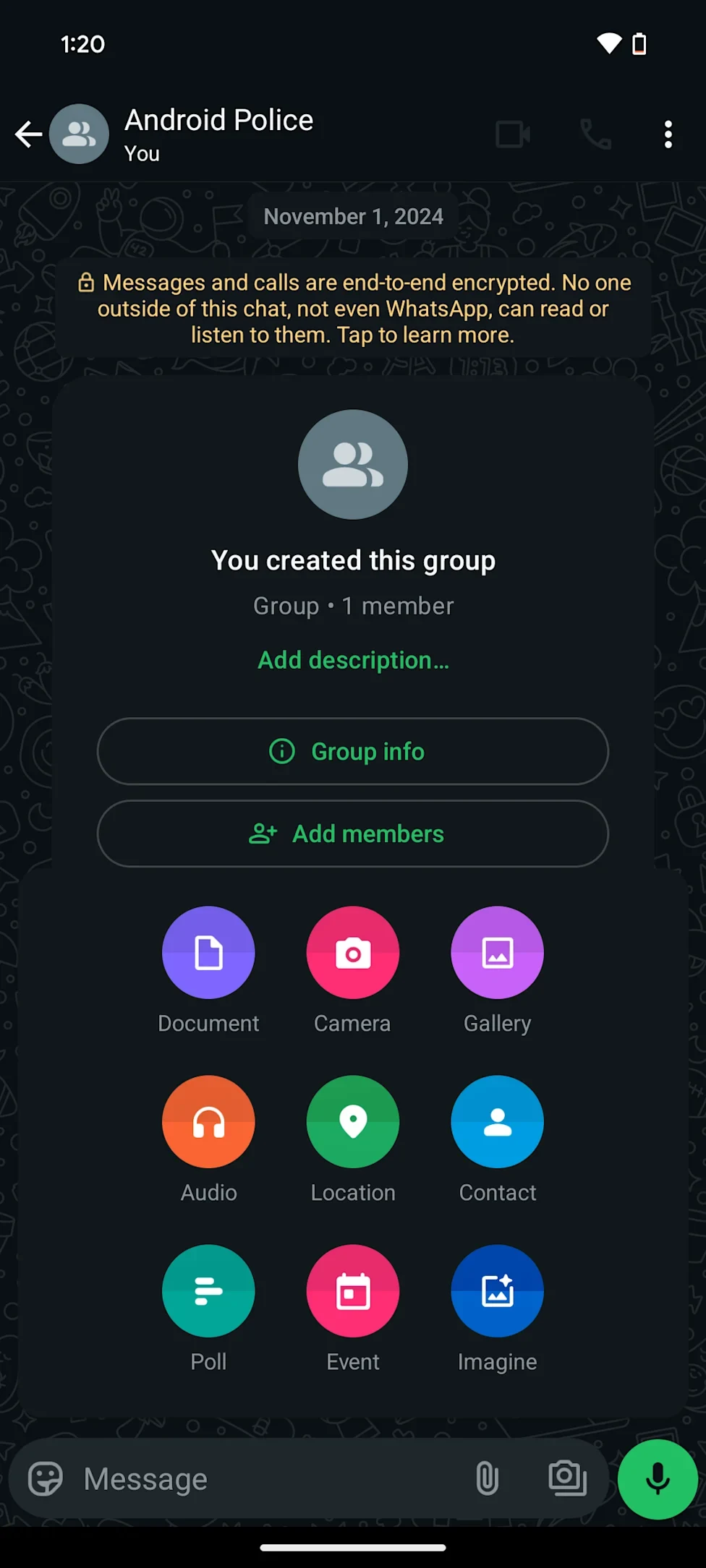
Illustration accompanying Actions Appear When They Become Relevant

Information Hierarchy Also Requires Control

Two Important Considerations. While deciding what information users need, we also need to consider:

Data Privacy

Who should access this information?

Information Hierarchy Also Requires Control: Data Privacy Who should access this information? Flexible Navigation Can users correct decisions without restarting?

Flexible Navigation

Can users correct decisions without restarting?

Information Hierarchy Also Requires Control: Data Privacy Who should access this information? Flexible Navigation Can users correct decisions without restarting?

Information Hierarchy Also Requires Control

Two Important Considerations. While deciding what information users need, we also need to consider:

Data Privacy

Who should access this information?

Information Hierarchy Also Requires Control: Data Privacy Who should access this information? Flexible Navigation Can users correct decisions without restarting?

Flexible Navigation

Can users correct decisions without restarting?

Information Hierarchy Also Requires Control: Data Privacy Who should access this information? Flexible Navigation Can users correct decisions without restarting?

FRAMEWORK CONTENTS

First Principles of SaaS UX

Search documentation

Search scope

Search across all eight guides.

Diagram detail